How OpenClaw Heartbeat Works: Building Proactive AI Agents That Wake Up on Schedule

26 years building and operating hosting infrastructure. Founded Remsys, a 60-person team that provided 24/7 server management to hosting providers and data centers worldwide. Built and ran dedicated server and VPS hosting companies. Agento applies that operational experience to AI agent hosting.
Table of Contents
- What Is Heartbeat?
- The HEARTBEAT.md File
- Scheduling and Intervals
- The Wake-Up Process
- Deduplication: Avoiding Repeat Alerts
- Delivery Channels and Visibility
- System Events: Immediate Heartbeat Triggers
- Multi-Agent Heartbeat
- Heartbeat vs. Cron
- Cost Optimization
- Practical Examples
- Heartbeat on Agento
- Common Patterns and Tips
- Conclusion
Most chatbots wait. You ask a question, they answer, and then they sit there—completely inert—until you ask another question.
AI agents are different. They can initiate. They can check on things while you sleep. They can remind you to take your creatine at 1 PM, alert you when a build fails, or summarize your inbox before your morning coffee.
This proactive capability is powered by the heartbeat system—a scheduled wake-up mechanism that gives agents the ability to act without being prompted.
This article explains exactly how OpenClaw's heartbeat works: the scheduling mechanism, the HEARTBEAT.md file format, deduplication logic, active hours configuration, and how to build agents that monitor, remind, and alert on your behalf.
What Is Heartbeat?
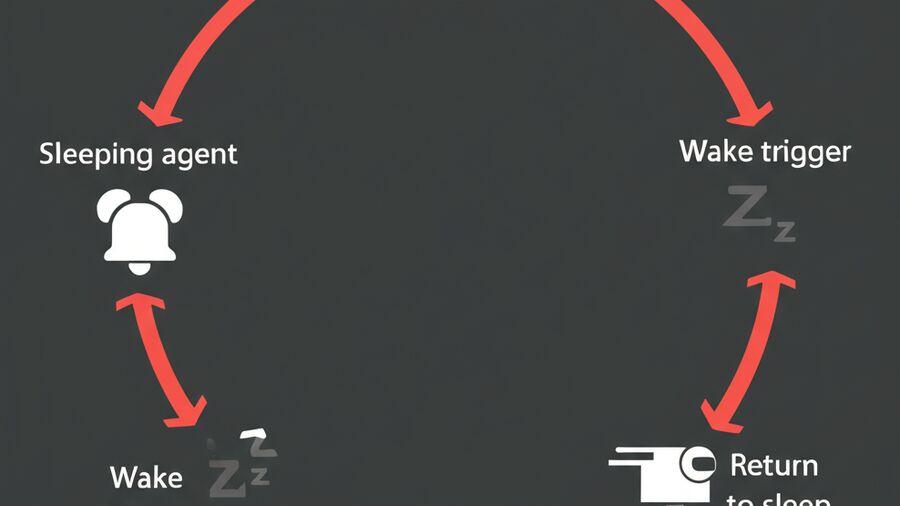
Heartbeat is a scheduled background check-in. At regular intervals (default: every 30 minutes), your agent wakes up, reads its instructions, checks conditions, and either takes action or goes back to sleep.
Think of it like a cron job, but for an AI agent. The agent has full access to its memory, tools, and context—it just runs on a schedule instead of waiting for user input.
The Basic Cycle
┌─────────────────────────────────────────┐
│                                         │
│  ┌─────────┐                            │
│  │  Sleep  │◄─────────────────────┐     │
│  └────┬────┘                      │     │
│       │                           │     │
│       ▼ (interval elapsed)        │     │
│  ┌─────────┐                      │     │
│  │  Wake   │                      │     │
│  └────┬────┘                      │     │
│       │                           │     │
│       ▼                           │     │
│  ┌─────────────────┐              │     │
│  │ Read HEARTBEAT.md│              │     │
│  └────┬────────────┘              │     │
│       │                           │     │
│       ▼                           │     │
│  ┌─────────────────┐              │     │
│  │ Check conditions │              │     │
│  └────┬────────────┘              │     │
│       │                           │     │
│       ▼                           │     │
│  ┌─────────────────────────┐      │     │
│  │ Take action OR report OK │──────┘     │
│  └─────────────────────────┘            │
│                                         │
└─────────────────────────────────────────┘
If there's nothing to report, the agent responds with HEARTBEAT_OK and goes back to sleep. If something needs attention, it takes action or sends you an alert.
The HEARTBEAT.md File
HEARTBEAT.md is your agent's checklist—the instructions it follows on every scheduled wake-up. It lives in your agent's workspace directory alongside SOUL.md, MEMORY.md, and other configuration files.
Basic Structure
# Heartbeat Checklist

## Pre-Flight
- Review memory/today.md to avoid duplicate actions
- Check current time in my timezone before time-based tasks

## Daily Checks

### Morning Briefing (9 AM)
- When: After 09:00, if not yet sent today
- Action: Summarize calendar for the day, highlight any conflicts
- Track: Note in memory when sent

### Creatine Reminder (1 PM)
- When: After 13:00, if not yet sent today
- Action: Send message: "💪 Time for creatine!"
- Track: Note in memory when sent

### End of Day Summary (6 PM Weekdays)
- When: After 18:00 on Mon-Fri, if not yet sent today
- Action: Summarize completed tasks, list pending items for tomorrow
- Skip if: Already sent today

## Rules
- Only report items that are truly new or changed
- If nothing actionable, reply HEARTBEAT_OK
- Never send duplicate reminders—always check memory first
What Makes HEARTBEAT.md Effective
Time-based conditions: Specify when tasks should run ("After 13:00", "On Monday mornings").
Deduplication instructions: Tell the agent to check memory before taking action to avoid duplicate reminders.
Clear actions: Define exactly what should happen (send a message, check a system, write a summary).
Skip conditions: Define when NOT to act (already sent today, weekend, etc.).
The HEARTBEAT_OK contract: When nothing needs attention, the agent should respond with exactly HEARTBEAT_OK. This signals a successful check with no action required.
Effective Content Detection
OpenClaw is smart about what counts as "real" content in HEARTBEAT.md. The following are considered effectively empty (and skip the API call to save costs):
- Whitespace-only lines
- Markdown headers with no content (
# Headingalone) - Empty list items (
- [ ],* [ ])
Only files with actual task content trigger a heartbeat LLM call. This optimization prevents unnecessary API costs when you have a template HEARTBEAT.md without real tasks.
Scheduling and Intervals
Default Behavior
By default, heartbeat runs every 30 minutes. The agent wakes up, processes HEARTBEAT.md, and either takes action or reports OK.
Configuration Options
{
  "agents": {
    "defaults": {
      "heartbeat": {
        "every": "30m",
        "activeHours": {
          "start": "08:00",
          "end": "22:00",
          "timezone": "America/New_York"
        }
      }
    }
  }
}
every: Interval between heartbeats. Accepts duration strings like "30m", "1h", "15m". Shorter intervals mean more frequent checks but higher token costs.
activeHours: Restrict heartbeat to specific times. The agent won't wake outside this window—no 3 AM reminders unless you want them.
timezone: Can be "user" (uses your configured timezone), "local" (server timezone), or an IANA timezone ID like "Asia/Bangkok".
Active Hours Logic
If you set start: "08:00" and end: "22:00", heartbeat only runs between 8 AM and 10 PM in the configured timezone.
For overnight windows, the logic handles wraparound: start: "22:00" and end: "06:00" means the agent runs from 10 PM to 6 AM (night shift schedule).
If no activeHours are configured, heartbeat runs 24/7.
The Wake-Up Process
When the scheduled interval elapses, here's what happens internally:
1. Pre-Flight Checks
Before even calling the LLM, the system checks several conditions:
Is heartbeat enabled? If disabled globally or for this specific agent, skip.
Are we in active hours? If outside the configured window, skip until next check in the window.
Is the main queue busy? If there are pending user requests, heartbeat waits and retries later. User conversations take priority.
Is HEARTBEAT.md effectively empty? If there's no real content to process, skip the API call.
Is delivery possible? If the configured channel isn't ready (API issues, auth expired), skip.
These checks prevent unnecessary API calls and ensure heartbeat doesn't interfere with active conversations.
2. Context Loading
When heartbeat runs, the agent has access to its full context:
- SOUL.md (personality and boundaries)
- IDENTITY.md (who it is)
- MEMORY.md (long-term facts)
- memory/today.md and memory/yesterday.md (recent context)
- HEARTBEAT.md (the checklist)
- Conversation history from the main session
This context awareness is what makes heartbeat powerful. The agent knows what happened earlier today, what tasks are pending, and what it already reminded you about.
3. LLM Processing
The system sends a prompt to the LLM:
"Read HEARTBEAT.md if it exists (workspace context). Follow it strictly. Do not infer or repeat old tasks from prior chats. If nothing needs attention, reply HEARTBEAT_OK."
The agent reads the checklist, evaluates conditions, checks memory for what's already been done, and decides whether to act or report OK.
4. Response Handling
The agent's response is processed:
If HEARTBEAT_OK (with no other substantive content): The heartbeat is considered successful with nothing to report. By default, this is silent—you don't get a message saying "nothing to report."
If there's content beyond the token: The response is delivered to your configured channel (Telegram, Slack, etc.) as an alert.
Token stripping: HEARTBEAT_OK is stripped from the beginning or end of responses, including markup variants like **HEARTBEAT_OK**. What remains is evaluated for delivery.
Short responses: If the remaining content after stripping is less than 300 characters (configurable via ackMaxChars), it's considered acknowledgment noise and skipped.
Deduplication: Avoiding Repeat Alerts
Nobody wants the same reminder five times. OpenClaw has built-in deduplication to prevent repeated alerts.
How It Works
After each heartbeat that sends a message, the system stores:
lastHeartbeatText: The content that was deliveredlastHeartbeatSentAt: Timestamp of delivery
On subsequent heartbeats, before delivering, the system checks:
- Is this text identical to the last delivery?
- Was that delivery within the last 24 hours?
If both conditions are true, the message is suppressed as a duplicate.
Supplementing with Memory
System-level deduplication catches exact duplicates. For more nuanced deduplication, use memory:
### Creatine Reminder (1 PM)
- When: After 13:00, if not yet sent today
- Action: Send message: "💪 Time for creatine!"
- **Track: Write "Creatine reminder sent at [time]" to memory/today.md**

### Pre-Flight
- **Review memory/today.md before any action to check what's already done**
By instructing the agent to check memory before acting, you get intelligent deduplication that handles variations in wording and complex conditions.
Delivery Channels and Visibility
Heartbeat alerts can go to different channels with different visibility settings.
Target Configuration
target: "last" (default): Deliver to the last external channel the user interacted with. If you last messaged via Telegram, heartbeat alerts go to Telegram.
target: "none": Run heartbeat for internal state updates only. The agent processes the checklist and updates memory, but doesn't send any messages. Useful for background maintenance tasks.
target: "<channel>": Explicitly specify a channel (telegram, whatsapp, slack, discord, etc.).
to: "<recipient>": Override the recipient. Useful for sending alerts to a specific chat ID or phone number.
Visibility Settings
{
  "channels": {
    "defaults": {
      "heartbeat": {
        "showOk": false,
        "showAlerts": true,
        "useIndicator": true
      }
    }
  }
}
showOk: Whether to send a message when heartbeat completes with nothing to report. Default is false (silent success).
showAlerts: Whether to deliver alerts when the agent has something to report. Default is true.
useIndicator: Whether to show a status indicator (typing indicator, etc.) during heartbeat processing.
Per-Channel Overrides
You can customize visibility per channel or even per account:
{
  "channels": {
    "telegram": {
      "heartbeat": {
        "showOk": true  // Show "All clear" messages on Telegram
      },
      "accounts": {
        "work": {
          "heartbeat": {
            "showAlerts": false  // Silence alerts on work account
          }
        }
      }
    }
  }
}
This lets you have chatty heartbeat on personal channels and silent monitoring on work channels.
System Events: Immediate Heartbeat Triggers
Besides scheduled intervals, certain events can trigger an immediate heartbeat:
Async Command Completion
When the agent runs an async command (a long-running background task), completion triggers an immediate heartbeat with a special prompt:
"An async command you ran earlier has completed. Please relay the result..."
This ensures you're notified promptly when background tasks finish, rather than waiting for the next scheduled heartbeat.
On-Demand Wake
Applications can call requestHeartbeatNow() to trigger immediate heartbeat processing. This is useful for:
- Webhook-triggered checks
- External system integration
- Manual "check now" commands
On-demand requests are coalesced (default: 250ms) to prevent flooding when multiple events fire simultaneously.
Multi-Agent Heartbeat
If you run multiple agents, each can have independent heartbeat configuration:
{
  "agents": {
    "list": [
      {
        "id": "personal",
        "heartbeat": {
          "every": "15m",
          "activeHours": { "start": "07:00", "end": "23:00" }
        }
      },
      {
        "id": "work",
        "heartbeat": {
          "every": "1h",
          "activeHours": { "start": "09:00", "end": "18:00" }
        }
      }
    ]
  }
}
Each agent maintains its own schedule, its own HEARTBEAT.md, and its own deduplication state. They operate independently.
The scheduler tracks nextDueMs for each agent and runs whichever agent is due next. There's no interference between agents.
Heartbeat vs. Cron
OpenClaw supports both heartbeat (interval-based) and cron (schedule-based) approaches. When should you use each?
Heartbeat: Interval-Based Awareness
- Runs every N minutes
- Checks multiple things in a single batched turn
- Shares conversation history with main session
- Ideal for: periodic monitoring, inbox checks, status awareness
Example: "Every 30 minutes, scan for anything urgent across email, calendar, and Slack."
Cron: Precise Scheduling
- Runs at exact times (cron expressions)
- Can use different models or settings
- Can run in isolated sessions (clean context)
- Ideal for: daily reports, weekly summaries, scheduled deliverables
Example: "Every Monday at 9 AM, generate a weekly progress report."
Using Both Together
They complement each other:
- Heartbeat handles continuous awareness (checking for urgent items, monitoring)
- Cron handles precise scheduled tasks (daily standup summary at 9:15 AM)
Heartbeat is your agent's background awareness. Cron is your agent's calendar.
Cost Optimization
Heartbeat runs frequently, and LLM calls cost money. Here's how to optimize:
Built-In Optimizations
Empty content detection: If HEARTBEAT.md has no real tasks, the API call is skipped entirely.
Active hours: No API calls outside your configured hours.
Queue priority: Heartbeat waits for user conversations to complete, avoiding duplicate processing.
Duplicate suppression: Identical alerts within 24 hours don't generate new API calls for delivery.
Your Optimizations
Keep HEARTBEAT.md focused: Long, complex checklists consume more tokens. Keep it short and actionable.
Use appropriate intervals: 30-minute default is reasonable. 5-minute intervals cost 6x more. Only shorten if genuinely needed.
Use target: "none" for background tasks: If heartbeat is just updating internal state, skip delivery entirely.
Batch related checks: Instead of separate heartbeats for email, calendar, and Slack, have one heartbeat check all three.
Consider cron for expensive analysis: If you need deep analysis (summarizing documents, generating reports), use cron with appropriate timing rather than running on every heartbeat.
Practical Examples
Daily Routine Assistant
# HEARTBEAT.md - Daily Routine

## Pre-Flight
- Check memory/today.md for what's already been done
- Note current Bangkok time

## Morning (After 8:00)
### Weather Check
- When: First heartbeat after 08:00
- Action: Check weather API, summarize if rain expected
- Track: Note in memory

### Calendar Preview
- When: After 08:30, before first meeting
- Action: List today's meetings with prep notes
- Skip if: Already sent today

## Afternoon
### Creatine Reminder
- When: After 13:00, not yet reminded today
- Action: "💪 Creatine time!"
- Track: Note in memory

### Focus Check
- When: After 14:00, if no deep work logged today
- Action: "You haven't logged any focus time today. Want to block some time?"
- Skip if: Focus session already logged

## Evening (After 18:00 Weekdays)
### Day Summary
- When: After 18:00 Mon-Fri
- Action: Summarize completed tasks, pending items, tomorrow's priorities
- Track: Note in memory

## Rules
- If nothing needs attention, reply HEARTBEAT_OK
- Never repeat a reminder sent today
- Be concise in all messages
Monitoring Assistant
# HEARTBEAT.md - System Monitoring

## Checks
### Build Status
- Check CI/CD pipeline for main branch
- Alert only if: Build failed or stuck > 30 minutes
- Include: Error summary and link to logs

### Uptime Monitor
- Check status page for production services
- Alert only if: Any service degraded or down
- Skip if: Already alerted about same incident

### Error Rate
- Check error tracking dashboard
- Alert only if: Error rate > 1% in last hour
- Include: Top 3 error types with counts

## Rules
- Only alert on NEW problems or status changes
- If everything healthy, reply HEARTBEAT_OK
- For each alert, include actionable next step
Meeting Prep Assistant
# HEARTBEAT.md - Meeting Prep

## Check Upcoming Meetings
- Look at calendar for meetings in next 2 hours
- For each meeting:
  - Check if prep notes exist in memory
  - Check if relevant docs are in workspace
  - Check if action items from last meeting are complete

## Alert Conditions
- Meeting in < 30 minutes with no prep notes
- Outstanding action items from previous meeting with same participants
- Missing documents mentioned in meeting invite

## Rules
- Only alert for meetings where I'm a required attendee
- Skip 1:1s with direct reports (those are informal)
- If all meetings are prepped, reply HEARTBEAT_OK
Heartbeat on Agento
When you run agents on Agento, heartbeat is fully managed:
No scheduler to configure: We run the heartbeat scheduler. You just define your HEARTBEAT.md.
No infrastructure concerns: Timer reliability, process restarts, timezone handling—all handled.
Cost visibility: See heartbeat token usage in your dashboard, broken down by agent.
Integrated with our memory system: Heartbeat seamlessly accesses the same memory files you configure.
Multi-agent support: Run multiple agents with different heartbeat schedules on the same account.
You focus on writing effective HEARTBEAT.md content. We handle the scheduling, delivery, and infrastructure.
Common Patterns and Tips
Start Simple
Begin with one or two heartbeat tasks. See how they work in practice before building complex checklists. It's easier to add complexity than to debug an overloaded HEARTBEAT.md.
Use Memory Religiously
The difference between annoying and helpful is deduplication. Always instruct your agent to check memory before taking action:
## Pre-Flight (ALWAYS DO THIS FIRST)
- Read memory/today.md
- Note what reminders have already been sent
- Do NOT repeat anything logged today
Be Specific About Conditions
Vague conditions lead to unpredictable behavior:
# Vague (bad)
- Remind about exercise if needed

# Specific (good)
- When: After 17:00, if no exercise logged in memory/today.md
- Action: "No exercise logged today. 20-minute walk before dinner?"
- Skip if: Exercise already logged or weekend
Handle Failures Gracefully
External checks can fail. Tell your agent what to do:
### Weather Check
- Action: Check weather API
- If API fails: Skip weather update, continue with other checks
- Do NOT alert about API failures (they're transient)
Use HEARTBEAT_OK Correctly
Train your agent to use the token properly:
## Response Rules
- If all checks pass with nothing to report: Reply exactly "HEARTBEAT_OK"
- If one or more alerts: Send alerts, do NOT include HEARTBEAT_OK
- Never explain why you're sending HEARTBEAT_OK—just send it
Conclusion
Heartbeat transforms passive chatbots into proactive assistants. Instead of waiting for you to ask, your agent wakes up on schedule, checks what needs attention, and either acts or goes back to sleep.
The key components:
- HEARTBEAT.md: Your agent's checklist of what to monitor and when
- Scheduling: Interval-based wake-ups with active hours configuration
- Deduplication: Built-in and memory-based prevention of repeat alerts
- Delivery: Flexible routing to different channels with visibility controls
- Context awareness: Full access to memory and conversation history
The system is designed to be cost-efficient (skipping unnecessary API calls), respectful of your time (active hours, deduplication), and genuinely useful (context-aware, actionable alerts).
Build agents that don't just respond—build agents that pay attention.
Ready to build proactive agents?
Agento handles heartbeat scheduling, delivery routing, and infrastructure. You write the HEARTBEAT.md. We make sure your agent wakes up on time, every time.
Related reading: