Using the Public API
Table of Contents
The Agento public API lets you create, configure, and chat with your agents from your own code. Anything you can do in the dashboard, you can do over HTTP: create agents, update their personality and workflow, install skills, ingest knowledge base entries, send messages and stream responses back, and inspect logs.
This guide walks you through getting your first key, making a call, and then pointing an LLM (Claude Code, ChatGPT, Cursor, anything) at the documentation so it can drive the API for you.
What you can do
The API exposes a few dozen endpoints across seven groups:
| Group | What it covers |
|---|---|
| Agents | Create, list, read, update, delete, start, stop, restart, status |
| Account | Account info, secrets, personality (SOUL.md), workflow (WORKFLOW.md), rules |
| Chat | Send messages with SSE streaming, read history, manage sessions |
| Knowledge | Ingest, list, delete chunks in the agent or swarm knowledge base |
| Logs | Recent logs and a live SSE stream |
| Skills | Browse the marketplace, install or uninstall skills on a specific agent, author and manage your own custom skills (uploading to the account catalog and installing on an agent are two separate calls) |
| Swarms | Create, list, read, update, delete swarms |
Architecture
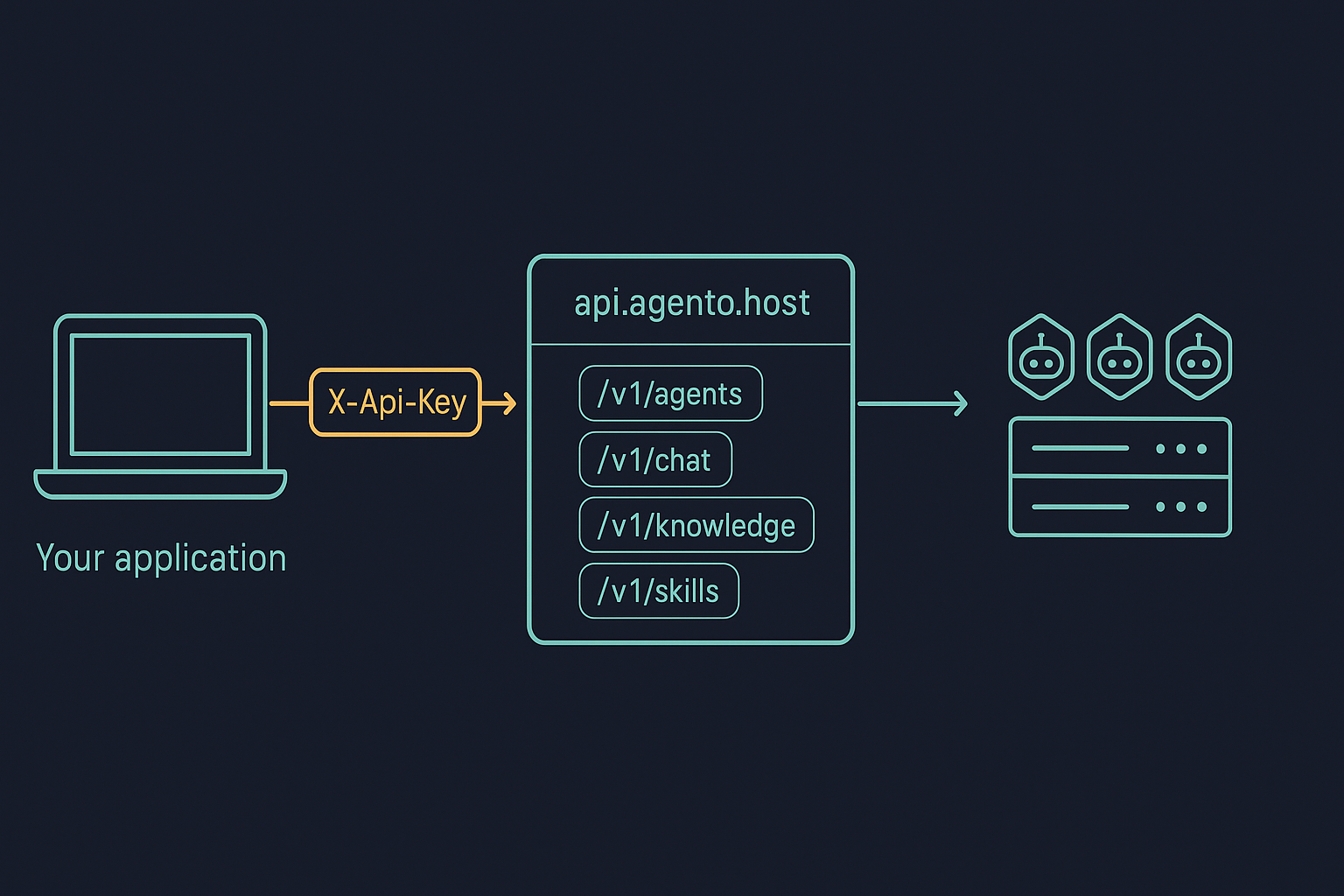
Your application makes an HTTP call with an X-Api-Key header. The API service at api.agento.host authenticates the key, checks scopes, applies the rate limit, then routes to the right operation: managing your agent records in the database, talking to the agent containers running on Agento's data plane, or hitting the knowledge base.
Create an API key
- Open https://agento.host/app/api-keys.
- Click Create API key.
- Give it a label and select the scopes you need. Pick the smallest set that does the job. You can always create another key.
- Copy the key. It starts with
ak_live_and is shown only once. Treat it like a password.
In production, route API calls through your own backend. Never put ak_live_ keys in browser-side JavaScript or mobile apps where they can be extracted.
Scopes
Scopes are checked on every request. A key without the required scope returns 403 forbidden.
| Scope | Allows |
|---|---|
agents:read |
List, read, status of agents |
agents:write |
Create, update, delete, start, stop, restart, secrets, personality, workflow, rules |
chat |
Send messages, read history, manage sessions |
knowledge:read |
List knowledge entries |
knowledge:write |
Ingest and delete knowledge entries |
logs |
Read and stream agent logs |
skills |
Browse marketplace, install or uninstall skills, author custom skills |
swarms:read |
List and read swarms |
swarms:write |
Create, update, delete swarms |
GET /v1/account requires no specific scope. Any valid key can fetch account info, plan, and usage.
Your first call
List the agents in your account:
curl https://api.agento.host/v1/agents \
  -H "X-Api-Key: ak_live_YOUR_KEY"
Response:
{
  "data": [
    {
      "id": "a1b2c3d4-e5f6-7890-abcd-ef1234567890",
      "name": "My Assistant",
      "status": "running",
      "region": "eu",
      "image": "openclaw/openclaw:latest",
      "swarm": null,
      "createdAt": "2026-01-15T10:30:00.000Z",
      "startedAt": "2026-01-15T10:31:00.000Z",
      "stoppedAt": null
    }
  ],
  "pagination": { "total": 1, "limit": 1, "offset": 0 }
}
Successful responses come wrapped in a data envelope. Lists also include a pagination block.
Create a new agent (requires agents:write and at least one LLM credential):
curl https://api.agento.host/v1/agents \
  -H "X-Api-Key: ak_live_YOUR_KEY" \
  -H "Content-Type: application/json" \
  -d '{
    "name": "Support Bot",
    "region": "eu",
    "secrets": { "anthropicApiKey": "sk-ant-api03-..." },
    "soulMd": "# SOUL.md\n\nYou are a helpful support agent.",
    "workflowMd": "# Workflow\n\n## Role\n\nYou answer customer support questions."
  }'
Where to find the rest
The API is fully self-documenting. Three URLs cover everything:
api.agento.host/openapi.json: the full OpenAPI 3.1 spec. Import into Postman, Insomnia, Bruno, Scalar, or any OpenAPI to SDK code generator.api.agento.host/docs: interactive Swagger UI. Click Authorize, paste your key, and try any endpoint live.api.agento.host/llms-full.txt: a flat markdown reference designed for LLM context windows. Every endpoint with examples on one page.
Rate limits
Each API key gets 120 requests per minute by default. Every response includes:
| Header | Meaning |
|---|---|
X-RateLimit-Limit |
Requests allowed in the window |
X-RateLimit-Remaining |
Requests remaining in the current window |
X-RateLimit-Reset |
Unix timestamp (seconds) when the window resets |
Retry-After |
On 429 responses, seconds to wait before retrying |
If you hit the limit you get 429 rate_limit_exceeded. Back off using Retry-After, then retry.
Errors
All errors come back in the same envelope:
{ "error": { "code": "string_code", "message": "Human-readable message" } }
Common codes:
| Status | Code | When |
|---|---|---|
| 400 | validation_error |
Body, query, or path failed validation |
| 401 | unauthorized |
Missing, invalid, expired, or revoked key |
| 403 | forbidden |
Key is valid but lacks the required scope, or the plan does not include the feature |
| 403 | limit_reached |
Plan limit hit (e.g. max agents, max running agents) |
| 404 | agent_not_found, swarm_not_found, etc. |
Resource does not exist or does not belong to your account |
| 409 | conflict |
Optimistic concurrency check failed (e.g. SOUL.md edited concurrently) |
| 429 | rate_limit_exceeded |
See rate limits above |
| 500 | internal_error |
Unexpected server error. Include X-Request-Id if you contact support. |
Every response carries an X-Request-Id header. Save it in your logs. It is the fastest way for support to trace a specific call.
Pointing Claude (or any LLM) at the API
The fastest way to use the API from inside an LLM session is to drop the full reference into context, then describe what you want.
With Claude Code or ChatGPT
- Fetch the flat reference:
curl https://api.agento.host/llms-full.txt - Paste the contents into a fresh conversation.
- Tell the model your API key (use a key with only the scopes you need) and ask it to do the work. For example: "Using my key
ak_live_..., list my running agents and start any that are stopped."
The model now has the full endpoint shapes, examples, scopes, and error codes. It can compose curl commands or call the API directly through whatever HTTP tool it has.
With OpenAPI to SDK code generators
If you would rather generate a strongly typed client:
# TypeScript types
npx openapi-typescript https://api.agento.host/openapi.json -o agento-api.d.ts

# Or a full client (Python, Go, Java, Ruby, etc.) via openapi-generator
openapi-generator-cli generate \
  -i https://api.agento.host/openapi.json \
  -g python \
  -o agento-client-py
With Postman or Insomnia
Import the URL directly: File then Import, paste https://api.agento.host/openapi.json. You get a full collection with every endpoint, body example, and response schema, ready to authorize with your key.
What is next
- The Managing skills via the API guide walks through authoring custom SKILL.md files and pushing them to your agents straight from Claude Code.
- The Using the Chat API guide goes deeper on streaming, sessions, and per-customer isolation.
- The Swarms guide covers grouping agents that share knowledge and credentials.
- For internal questions, the
X-Request-Idplus a short description of what you tried is the fastest path to support.